In the world of social media, where visuals play an increasingly important role, understanding the proper image sizes for each platform is crucial. X (formerly known as Twitter) is no exception.
Whether you’re an individual trying to connect with friends or a business aiming to increase your audience, ensuring that your images appear correctly on X can significantly improve your engagement rates.
In this guide, we’ll explore X image size specifications for 2024, covering recommended dimensions, file types, and tips for optimizing your visuals.
Understanding the proper X image size will help ensure that your content looks its best across all devices.
See more articles: A Guide to Facebook and Instagram Post Sizes, Ad Specs, and Photo Dimensions
Table of Contents
Why X Image Sizes Matter
Images Are a Key Component of Communication on X
Images are a key component of communication on X. While text tweets are central, adding images can amplify your message. However, incorrectly sized images can lead to awkward cropping, distorted proportions, and a loss of visual quality.
Why You Should Follow X’s Image Size Guidelines
Adhering to X image size guidelines ensures your images appear crisp and professional on both mobile and desktop views. This simple step keeps your visuals sharp and enhances the overall presentation of your posts.
Maximize Engagement with Proper Image Sizes
Whether you’re sharing personal photos, promoting products, or creating ads, using the recommended X image size will make your posts visually appealing, professional, and more likely to generate higher engagement.
Additionally, following these specifications prevents cropping issues that might obscure important elements of your image.
See more articles: How to Rank Your Website on ChatGPT in 2024
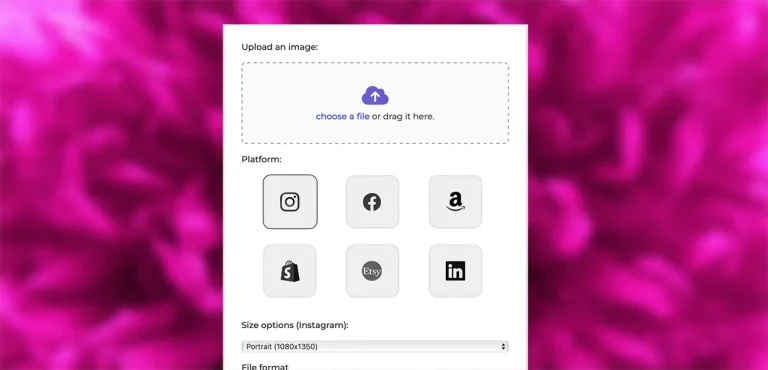
Use our Free Image Resizer
Resize your photos now with the Pro Photo Studio Image Resizer!
X Image Sizes and Types for 2024

X (formerly Twitter) supports multiple image formats, each with specific dimensions and size recommendations. These include profile photos, header images, tweets with single or multiple images, and media in promoted content such as cards and ads.
Let’s break down these image types and their respective sizes.
X Profile Picture Size
- File size: Up to 2 MB
- Recommended size: 400 x 400 pixels
- Displayed size: 200 x 200 pixels
- File formats: PNG, JPG, or GIF
Your profile picture is the face of your brand or personality on X. This image is prominently displayed next to every tweet you send and is one of the first things users see when they visit your profile.
To maintain professionalism and clarity, stick to a resolution of 400 x 400 pixels, even though X displays the image at 200 x 200 pixels. Ensure your photo is high-quality and doesn’t exceed the 2 MB file size limit.
Pro tip: Consistency is key! Use the same profile picture across all your social media platforms to boost brand recognition.
See more articles: 5 Best Photo Background Eraser Apps in 2024
X Header Image Size
- File size: Up to 2 MB
- Recommended size: 1500 x 500 pixels
- Displayed size: Maximum of 1263 x 421 pixels
- File formats: PNG, JPG
The header image, also known as the banner or cover photo, sits at the top of your profile page and serves as a visual introduction to your account.
The recommended X image size for the header is 1500 x 500 pixels, but the image is displayed at 1263 x 421 pixels. Always ensure that important elements are centered, as parts of the image can be cropped depending on the device.
X Image Post Size
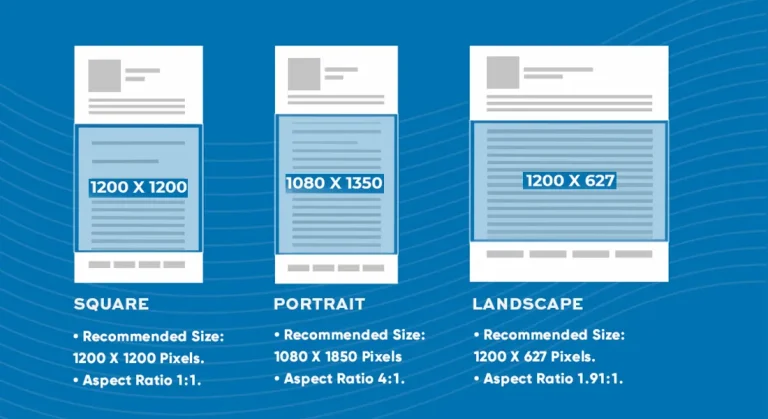
- Landscape image size: 1600 x 900 pixels
- Square image size: 1080 x 1080 pixels
- Portrait image size: 1080 x 1350 pixels
- Aspect ratios: 2:1, 1:1 for square images, and 3:4 for portraits.
When uploading images directly to your X feed, it’s essential to select the right dimensions to avoid automatic cropping. For single image posts, use the following X image sizes:
- Landscape images: Best for panoramic or wider photos, the recommended size is 1600 x 900 pixels, with a 16:9 aspect ratio.
- Square images: Perfect for a balanced look, use a 1080 x 1080 pixel image.
- Portrait images: Ideal for vertical visuals, 1080 x 1350 pixels works well, ensuring the image isn’t cropped awkwardly in the timeline.
X In-Stream Image Size
- Recommended size: 440 x 220 pixels
- Displayed size: 1024 x 512 pixels
In-stream images are smaller images that appear directly in the feed without expanding when clicked. These images are displayed at 1024 x 512 pixels but should be uploaded at a minimum of 440 x 220 pixels to maintain quality across devices.
See more articles: 5 Best Hand Grip Camera Straps in 2024
X Image Carousel Size
- File size: Up to 5 MB
- Recommended size: 1200 x 628 pixels (1.91:1 aspect ratio), or 1200 x 1200 pixels for square images
An image carousel is a set of images that users can swipe through in a single tweet. For optimal results, maintain consistency by using a standard 1200 x 628 pixel size for landscape images or 1200 x 1200 pixels for square images.
Carousels are highly interactive, offering brands an opportunity to showcase multiple products or ideas in a single tweet.
X Card Image Size
- File size: Up to 5 MB
- Recommended size: 1200 x 628 pixels
- Aspect ratio: 1.91:1
X cards are multimedia tweets that include links, titles, descriptions, and images. These are often used in marketing campaigns. For standard X cards, aim for a 1200 x 628 pixel size, which aligns with a 1.91:1 aspect ratio.
This format is ideal for making the most of the available space while ensuring the image stays clear and readable.
Use our Free Image Resizer
Resize your photos now with the Pro Photo Studio Image Resizer!
Image File Types Supported by X

While X supports a variety of image formats, each has its strengths and limitations. Understanding which format to use can help optimize the appearance and performance of your images.
JPG
JPG, or JPEG, is the most commonly used format for images on X. It’s ideal for photographs and images with many colors. However, since it is a compressed format, some image quality can be lost, especially when dealing with fine details. JPG files can be up to 5 MB in size.
Best for: Photos, high-detail images
PNG
PNG is a lossless image format, meaning it maintains high quality without compressing the image. It supports transparent backgrounds, making it ideal for logos and graphics. PNG files can be up to 5 MB in size.
Best for: Graphics, logos, images with transparent backgrounds
GIF
GIFs are short, looped animations that are great for playful, fun content. X allows GIFs with a maximum size of 15 MB. GIFs are a great way to add movement and interactivity to your timeline.
Best for: Short animations, lightweight graphics
WebP
WebP is a newer image format designed for high-quality images with smaller file sizes. X supports WebP for high-detail images, allowing for better compression without compromising quality. Images can be up to 5 MB in size.
Best for: High-quality images with faster loading times
See more articles: A Guide to Facebook and Instagram Post Sizes, Ad Specs, and Photo Dimensions
Use our Free Image Resizer
Resize your photos now with the Pro Photo Studio Image Resizer!
Optimizing X Images for Both Web and Mobile
With millions of users accessing X via mobile devices, it’s essential to ensure your images look great on both mobile and desktop views. Here are some tips to help you optimize your visuals.
Choose the Right Resolution
For high-quality images on both desktop and mobile, the recommended resolution is 72 dpi. This ensures your images remain crisp and clear on all devices. Additionally, always aim for a minimum width of 600 pixels to prevent distortion or loss of quality when viewed on larger screens.
Compress Your Images
Image compression is essential for quick load times. While maintaining quality is important, make sure your images are compressed enough to load quickly across different devices. JPEG is the best format for photographs, while PNG works well for graphics. Don’t over-compress, as this could result in blurry or pixelated images.
Add Alt Text for Accessibility
Alt text describes the content of an image for users who can’t see it, such as those using screen readers. Adding alt text not only ensures your images are accessible but also boosts the SEO of your posts.
How X Image Sizes Compare to Other Platforms
| Platform/Ad Type | Image Size (Square) | Image Size (Landscape) | File Size Limit | Notes |
|---|---|---|---|---|
| N/A | 1200 x 630 pixels | 8 MB | Slightly larger image size compared to X | |
| X (formerly Twitter) | 1024 x 512 pixels | N/A | 5 MB | Lower image size limit than Facebook |
| 1080 x 1080 pixels | N/A | N/A | Square and portrait images; portrait dimensions are 1080 x 1350 pixels | |
| X Image Ads | 1200 x 1200 pixels | 1200 x 628 pixels | N/A | High-quality product display |
| X Carousel Ads | 1200 x 1200 pixels | 1200 x 628 pixels | N/A | Allows scrolling through multiple images |
Understanding how X image sizes compare to those of other social platforms can help you create content that works seamlessly across the board.
Facebook recommends a minimum size of 1200 x 630 pixels for posts, which is slightly larger than X’s 1024 x 512 pixels. Additionally, Facebook allows a maximum file size of 8 MB, while X limits images to 5 MB.
Instagram’s image dimensions are more restrictive, with square images set at 1080 x 1080 pixels and portrait images at 1080 x 1350 pixels. However, both platforms allow users to upload multiple images in a single post, providing opportunities for creative engagement.
Best Practices for X Ads
X ads are a great way to promote your content, products, or services to a wider audience. The right image sizes and formats can make or break the effectiveness of your ads.
Image Ads
For standalone image ads, stick to the 1200 x 1200 pixels size for square images or 1200 x 628 pixels for landscape images. Both formats provide ample space to showcase your product while maintaining high quality.
Carousel Ads
Image carousels allow users to scroll through multiple images in a single ad. For the best results, keep each image at 1200 x 628 pixels or 1200 x 1200 pixels, depending on whether you prefer landscape or square formatting.
Use our Free Image Resizer
Resize your photos now with the Pro Photo Studio Image Resizer!
Conclusion
Optimizing your images according to the X image size guidelines ensures that your content looks professional, sharp, and engaging.
By adhering to these specifications, your posts will resonate better with your audience, leading to higher engagement, whether you’re a brand, business, or casual user.
With the multitude of image types supported by X, from profile pictures to ads, following these best practices will help you stay ahead in the fast-paced world of social media.
Make sure you resize, format, and optimize your images to make the most out of your X experience!
if you’re looking to increase your online conversion but still feel you are not sure where to start – check out these resources below: