13 Best Image Resizer Tools in 2026
Optimize your images for Amazon, Shopify, social media, and more. Free tools to resize, compress, and perfect your product photos.

High-quality images are crucial for the success of your e-commerce listings, online advertisements, and social media engagement. However, taking new product photos for each platform can be costly and time-consuming. A more efficient solution is to use an image resizer, which allows you to optimize a single product photo for multiple platforms and purposes.
This strategy applies to a wide range of products, from cosmetics and food to seasonal items, making it indispensable for anyone selling online. In this article, we'll explore the 13 best image resizer tools available in 2026—including two powerful new additions: Canva and Adobe Express.
📋 Quick Navigation
📐 Why Resize Your Images?
Before diving into the best tools, it's important to understand why resizing images is essential for your online success.
📦 Large File Sizes
High-resolution photos can be several thousand pixels wide. Uploading oversized images leads to slower page loading times, negatively impacting user experience and conversion rates.
🔍 Blurriness & Pixelation
Images that are too large get automatically downsized by platforms, causing blurriness. Too small? They become pixelated when stretched. Proper resizing prevents both issues.
📱 Platform Requirements
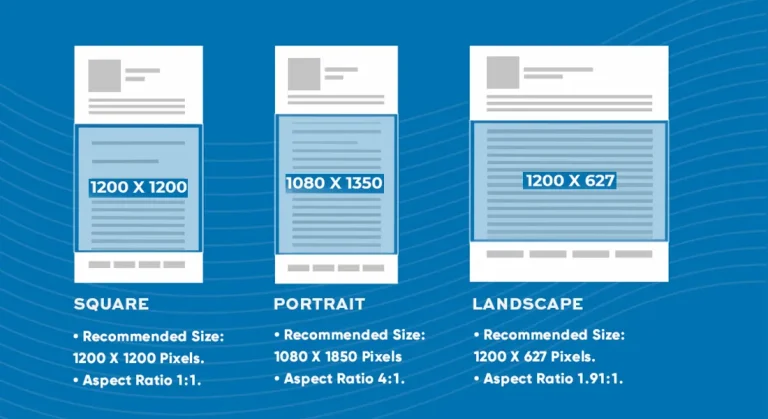
Different platforms require different dimensions. Instagram Stories need 1080×1920, Amazon wants 2000×2000. Resizing ensures images display properly everywhere.
1. Pro Photo Studio Image Resizer
The Pro Photo Studio Image Resizer is a specialized online tool designed for photographers, e-commerce sellers, and web designers who need to resize images while maintaining high quality. This tool is part of Pro Photo Studio's suite of online services, aimed at providing professional-grade tools that are easy to use.
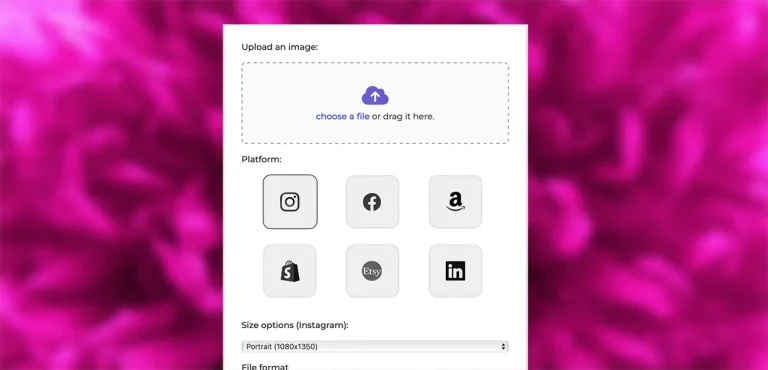
It allows users to resize images by specific dimensions or percentages, and the interface is tailored to ensure that even large images retain their clarity and detail after resizing. Best of all, it knows the exact specs for every major selling platform.
✅ Pros
- High-quality resizing with maintained clarity
- User-friendly, intuitive interface
- Platform-specific presets (Amazon, Shopify, etc.)
- No registration required
- Completely free to use
❌ Cons
- Focused on resizing (no filters or effects)
- Single image processing only
2. Canva NEW
Canva has become one of the most popular design platforms in the world, and its image resizer is a standout feature. Beyond simple resizing, Canva offers an all-in-one design platform where you can crop, adjust brightness, add text, and create complete designs—all in one place.
The free version allows basic resizing, while Canva Pro offers "Magic Resize" that instantly converts your design to multiple platform sizes with one click. With AI tools like Magic Expand (which extends images in any direction) and Background Remover, Canva has evolved far beyond a simple resizer.
✅ Pros
- All-in-one design platform
- Social media presets included
- AI-powered Magic Expand (Pro)
- Bulk resizing available
- Browser-based, no download needed
❌ Cons
- Magic Resize requires Pro subscription
- Can be overwhelming for simple tasks
- Requires account creation
3. Adobe Express NEW
Adobe Express brings the power of Adobe to a simple, browser-based interface. Its image resizer includes preset sizes for all major social media platforms (Instagram, Facebook, X, YouTube, Pinterest) and allows custom dimensions. The free plan includes core features like cropping, resizing, and basic photo editing.
What sets Adobe Express apart in 2026 is its Firefly AI integration. Premium users can use AI to expand images, remove backgrounds, and even generate new content with text prompts. It's part of a larger creative ecosystem that integrates with Photoshop and Lightroom.
✅ Pros
- Adobe quality and reliability
- Social media presets included
- AI-powered expansion (Premium)
- Integrates with Creative Cloud
- Free plan available
❌ Cons
- No batch processing
- AI features require Premium
- JPG and PNG only
🚀 Try Our Free Image Resizer
Resize your photos for Amazon, Shopify, Etsy & more in seconds!
TRY IMAGE RESIZER FREE →4. PicResize

PicResize is one of the oldest and most reliable online image resizers, having resized over 150 million images since its inception. The platform is tailored for users who need quick and straightforward image resizing, with essential editing tools like cropping, rotating, and applying simple effects.
✅ Pros
- Simple, intuitive interface
- Batch processing available
- No registration needed
- Proven track record (150M+ images)
❌ Cons
- Limited advanced features
- Contains ads (free version)
5. ResizePixel

ResizePixel is a minimalistic tool designed for simplicity and speed. It allows users to resize images by dimensions or percentage, supporting formats such as PNG, JPG, and WEBP. The platform focuses solely on resizing, making it a no-frills option for quick image adjustments.
✅ Pros
- Clean, clutter-free interface
- Instant processing
- Multiple format support
- Completely free
❌ Cons
- No batch processing
- No cropping or rotating
6. ILoveIMG

ILoveIMG is a versatile online platform offering a wide range of image editing tools, including resizing, compressing, cropping, and converting images. It also allows users to add watermarks and create meme-style images.
✅ Pros
- Comprehensive toolset
- Batch processing
- User-friendly interface
❌ Cons
- File size limitations (free)
- Limited format support
7. BeFunky

BeFunky is a popular online photo editor that offers a rich set of tools for image editing, including resizing, cropping, and applying various effects. In addition to basic editing, BeFunky allows users to create photo collages, design graphics, and use templates for creative projects.
✅ Pros
- Feature-rich editor
- Batch processing
- Creative templates
❌ Cons
- Premium features locked
- Learning curve for beginners
🚀 Try Our Free Image Resizer
Resize your photos for Amazon, Shopify, Etsy & more in seconds!
TRY IMAGE RESIZER FREE →8. Simple Image Resizer

Simple Image Resizer lives up to its name by offering an easy-to-use platform for resizing images. It allows users to resize images by specifying dimensions or by reducing them by a percentage. The platform is straightforward, with no extra features, making it ideal for those who need a quick and simple solution.
✅ Pros
- Straightforward interface
- Multiple format support
- No sign-up needed
❌ Cons
- No advanced editing tools
- Single image processing
9. Photo Resizer

Photo Resizer provides a quick and efficient way to resize images online. The platform is designed with a drag-and-drop interface that makes it easy for users to upload images and adjust their size. The tool is particularly useful for those who need to resize images without any additional editing.
✅ Pros
- Fast and efficient
- Drag-and-drop interface
- No registration required
❌ Cons
- Basic features only
- No batch processing
10. Img2Go

Img2Go is an all-in-one online image editor that offers a wide range of features, including resizing, cropping, rotating, and converting images. It supports multiple formats and provides tools for optimizing images for web use. The platform is designed to be versatile, catering to users who need both basic and advanced image editing capabilities.
✅ Pros
- Comprehensive editing tools
- Multiple format support
- Advanced optimization features
❌ Cons
- Cluttered interface
- File size restrictions (free)
11. ImageResizer.com

ImageResizer.com offers a straightforward approach to resizing images, with options for setting custom dimensions, reducing file size, and cropping images. The platform supports batch processing, allowing users to resize multiple images simultaneously. Active since 2012, it's resized millions of images for free with no watermarks.
✅ Pros
- Batch resizing available
- Easy-to-use interface
- 256-bit SSL encryption
- No watermarks
❌ Cons
- Limited editing options
- Processing limitations (free)
12. Bulk Resize Photos

Bulk Resize Photos is specifically designed for users who need to resize a large number of images quickly. The platform processes images locally in the browser, meaning there's no need to upload files to a server, which significantly speeds up the process and protects your privacy.
✅ Pros
- Lightning-fast local processing
- No file uploads (privacy)
- Flexible options (%, dimensions, file size)
- Drag-and-drop interface
❌ Cons
- Resizing only (no editing)
- No cropping or rotation
13. Kapwing

Kapwing is a versatile online platform that allows users to resize both images and videos. It includes a broad set of tools for creating and editing content, such as adding text, overlays, and applying effects. The platform is popular among content creators who need to produce engaging visuals for social media.
✅ Pros
- Images AND video resizing
- Extensive editing tools
- Collaborative features
❌ Cons
- Watermark on free version
- File size limitations
📊 Quick Comparison Table
| Tool | Price | Batch | AI Features | Best For |
|---|---|---|---|---|
| Pro Photo Studio | Free | ❌ | ❌ | E-commerce sellers |
| Canva | Free / $12.99 | ✅ (Pro) | ✅ (Pro) | All-in-one design |
| Adobe Express | Free / $9.99 | ❌ | ✅ (Premium) | Adobe ecosystem |
| PicResize | Free | ✅ | ❌ | Quick batch resizing |
| Bulk Resize Photos | Free | ✅ | ❌ | Fast local processing |
| Kapwing | Free / $16 | ✅ (Pro) | ✅ | Images + Video |
📏 Platform Image Size Guide 2026
🛒 E-commerce
- Amazon: 2000×2000px (min 1000×1000)
- Shopify: 2048×2048px
- Etsy: 2000×2000px
- Walmart: 2000×2000px
- eBay: 1600×1600px
📱 Social Media
- Instagram Post: 1080×1080px
- Instagram Story: 1080×1920px
- Facebook Post: 1200×630px
- Pinterest Pin: 1000×1500px
- X (Twitter): 1200×675px
❓ Frequently Asked Questions
📚 Additional Resources
Looking to increase your online conversion? Check out these resources:
- Get a Quote – Professional product photography services
- Membership Plans – Ongoing photography support
- Our Locations – Find a studio near you
- Success Stories – See how others increased sales by 150%
Ready to Optimize Your Product Images?
Use our free image resizer tool to perfectly optimize your photos for Amazon, Shopify, Etsy, and every major platform.
✓ No registration required ✓ Platform-specific presets ✓ 100% free