LinkedIn has become the premier platform for B2B marketing, with over 1 billion members and 4 out of 5 users in decision-making roles. Whether you’re building your personal brand or running paid campaigns, using the correct image and ad sizes is essential for professional results.
Incorrectly sized images get cropped, stretched, or compressed—making your brand look unprofessional. This comprehensive guide covers every LinkedIn image specification you need for 2026, from profile photos to sponsored content ads.
We’ll cover personal profiles, company pages, organic posts, and all paid ad formats—with mobile-responsive recommendations since most LinkedIn users now access the platform via mobile devices.
Table of content
LinkedIn Personal Profile Image Sizes
Your LinkedIn profile is often the first impression professionals have of you. These image specifications ensure your profile looks polished across all devices.
Profile Photo
Your profile photo appears throughout LinkedIn—in search results, comments, messages, and connection requests. LinkedIn crops this image to a circle, so keep your subject centered.
| Specification | Requirement |
|---|---|
| Recommended Size | 400 × 400 pixels |
| Maximum Size | 7680 × 4320 pixels |
| Aspect Ratio | 1:1 (square) |
| File Format | JPG or PNG |
| Max File Size | 8 MB |
Pro Tip: Use a high-quality headshot with good lighting. Your face should fill approximately 60% of the frame. Avoid logos or group photos for personal profiles.
Profile Banner (Background Image)
The banner image is prime real estate for personal branding. Use it to showcase your expertise, promote a project, or reinforce your professional identity. Note that it displays differently on desktop and mobile—keep key elements centered.
| Specification | Requirement |
|---|---|
| Recommended Size | 1584 × 396 pixels |
| Aspect Ratio | 4:1 |
| File Format | JPG or PNG |
| Max File Size | 8 MB |
Pro Tip: Your profile photo overlaps the bottom-left corner of the banner on desktop. Design with a 20-40 pixel margin around important elements, and always preview on both desktop and mobile before publishing.
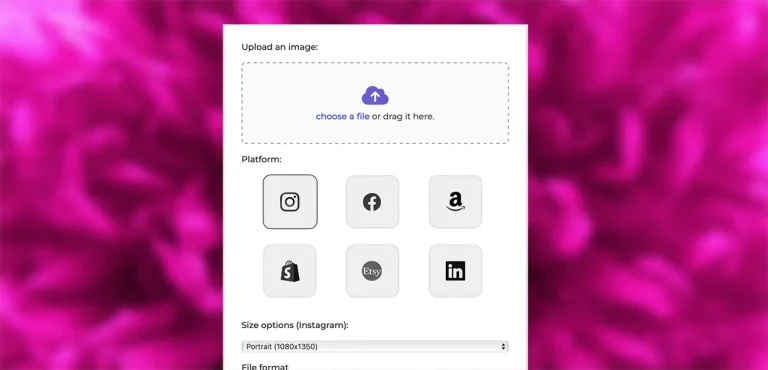
Use our Free Image Resizer
RESIZE YOUR PHOTOS NOW WITH THE PRO PHOTO STUDIO IMAGE RESIZER!
👆 TRY OUR IMAGE RESIZER!LinkedIn Company Page Image Sizes
Company pages have different specifications than personal profiles. These images represent your brand to potential customers, partners, and job candidates, so quality matters.
Company Logo
Your company logo appears in search results, job postings, and sponsored content. Upload a square version of your logo for best results.
| Specification | Requirement |
|---|---|
| Recommended Size | 300 × 300 pixels (up to 400 × 400 for higher resolution) |
| Aspect Ratio | 1:1 (square) |
| File Format | PNG (for transparency) or JPG |
| Max File Size | 8 MB |
Company Page Cover Image
The company cover image is narrower than personal profile banners. Use it to feature your headquarters, team, products, or a branded message with your company slogan.
| Specification | Requirement |
|---|---|
| Recommended Size | 1128 × 191 pixels |
| Aspect Ratio | Approximately 6:1 |
| File Format | JPG or PNG |
| Max File Size | 8 MB |
LinkedIn Event Cover Image
Hosting a webinar, conference, or networking event? The event cover image is essential for attracting registrations.
| Specification | Requirement |
|---|---|
| Recommended Size | 1776 × 444 pixels |
| Aspect Ratio | 4:1 |
| File Format | JPG or PNG |
| Max File Size | 10 MB |
LinkedIn Ad Specifications
Before launching any campaign, it’s essential to ensure your assets align with LinkedIn’s specifications. This not only guarantees optimal display but also enhances user engagement.
LinkedIn Feed Post Image Sizes
Organic posts in the LinkedIn feed support multiple image formats. Choosing the right dimensions ensures your content looks professional and captures attention as users scroll.
Single Image Posts
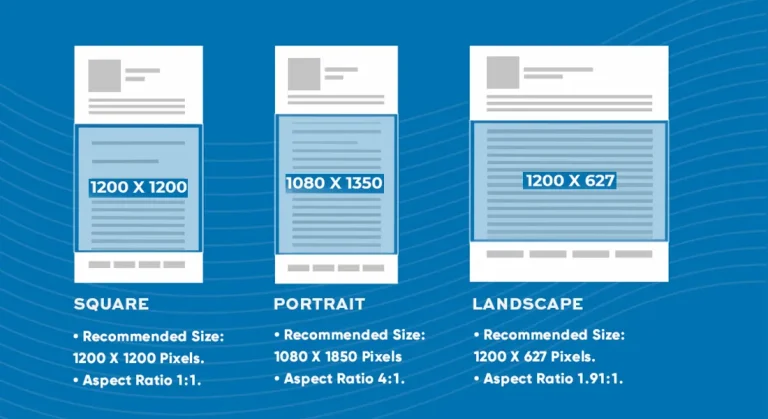
LinkedIn supports landscape, square, and portrait orientations for single image posts. Portrait (vertical) images take up more screen space on mobile, which can boost engagement.
| Format | Recommended Size | Aspect Ratio | Best For |
|---|---|---|---|
| Landscape | 1200 × 627 pixels | 1.91:1 | Link previews, desktop viewing |
| Square | 1200 × 1200 pixels | 1:1 | Versatile for desktop & mobile |
| Portrait | 1080 × 1350 pixels | 4:5 | Mobile-first, maximum visibility |
File Specifications: JPG or PNG format, maximum 5 MB per image. LinkedIn supports images up to 36 megapixels, but optimize file size under 5 MB for faster loading.
Link Preview Images
When you share a link, LinkedIn automatically pulls the Open Graph image from the page. For best results, ensure your website's OG images are properly sized.
| Specification | Requirement |
|---|---|
| Recommended Size | 1200 × 627 pixels |
| Minimum Size | 640 × 360 pixels |
| Aspect Ratio | 1.91:1 |
Document Posts (PDF Carousels)
PDF document posts (organic carousels) are highly engaging on LinkedIn. Users can swipe through slides directly in the feed. These are different from paid carousel ads.
| Specification | Requirement |
|---|---|
| Recommended Size | 1080 × 1080 pixels (square) or 1920 × 1080 pixels (landscape) |
| File Format | PDF, DOC, DOCX, PPT, PPTX |
| Max Pages | 300 pages |
| Max File Size | 100 MB |
Pro Tip: Design your first slide as an attention-grabbing cover—it's what users see before they start swiping. Use clear fonts, bold colors, and minimal text.
Use our Free Image Resizer
RESIZE YOUR PHOTOS NOW WITH THE PRO PHOTO STUDIO IMAGE RESIZER!
👆 TRY OUR IMAGE RESIZER!Sponsored Content Ad Specifications
Sponsored Content Ads appear directly in the LinkedIn feed of your target audience. They're versatile, supporting brand awareness through lead generation campaigns. Here are the 2026 specifications for each format.
Single Image Ads
The most popular ad format on LinkedIn. Single image ads blend naturally into the feed while clearly marked as "Promoted."
| Format | Recommended Size | Aspect Ratio |
|---|---|---|
| Landscape | 1200 × 627 pixels | 1.91:1 |
| Square | 1200 × 1200 pixels | 1:1 |
| Vertical (Mobile Only) | 720 × 900 pixels | 4:5 |
Image Requirements: JPG, PNG, or GIF (non-animated). Maximum file size 5 MB.
| Text Element | Character Limit |
|---|---|
| Headline | 70 characters (200 max) |
| Introductory Text | 150 characters to avoid truncation (600 max) |
| Description (optional) | 70 characters (300 max) |
Pro Tip: Avoid horizontal/landscape images on mobile—they appear very small in the feed. Square (1:1) and vertical (4:5) formats perform better on mobile where most LinkedIn users are.
Carousel Image Ads
Carousel ads display multiple images (cards) that users can swipe through, perfect for storytelling or showcasing various product angles.
| Specification | Requirement |
|---|---|
| Image Size | 1080 × 1080 pixels |
| Aspect Ratio | 1:1 (square only) |
| Number of Cards | 2 to 10 cards |
| File Format | JPG or PNG |
| Max File Size | 10 MB per image |
| Card Headline | 45 characters (2 lines max before truncation) |
| Introductory Text | 150 characters to avoid truncation (255 max) |
Note: Carousel cards can link to different landing pages. However, if using a Lead Gen Form, all cards will link to the same form. Video is not supported in carousel ads.
Video Ads
Video ads offer a dynamic way to engage your audience. LinkedIn users spend 3x more time with video content than static images, making video essential for brand awareness and thought leadership.
| Aspect Ratio | Recommended Resolution | Best For |
|---|---|---|
| 16:9 (Landscape) | 1920 × 1080 pixels | Desktop, professional presentations |
| 1:1 (Square) | 1080 × 1080 pixels | Universal (desktop & mobile) |
| 4:5 (Vertical) | 1080 × 1350 pixels | Mobile-first campaigns |
| 9:16 (Full Vertical) | 1080 × 1920 pixels | Mobile-only delivery |
Important: 9:16 vertical video ads are only delivered to mobile devices. If targeting both desktop and mobile users, use 1:1 or 4:5 aspect ratios.
| Technical Spec | Requirement |
|---|---|
| Duration | 3 seconds to 30 minutes (15-30 seconds recommended) |
| File Format | MP4 |
| File Size | 75 KB minimum, 200 MB maximum |
| Frame Rate | 24-30 fps recommended |
| Audio | AAC or MPEG-4, less than 64 KHz |
| Thumbnail | JPG or PNG, max 2 MB (match video aspect ratio) |
Pro Tips:
- Add captions: 85% of LinkedIn videos are watched with sound off. Captions boost engagement significantly.
- Hook viewers fast: Grab attention within the first 3 seconds—91% of LinkedIn members watch on mobile.
- Keep it short: Videos under 30 seconds get 200% more completion rates.
Sponsored Messaging Ads
Want a direct line to your target audience's inbox? Sponsored Messaging Ads (formerly InMail) let you send personalized messages or create interactive chatbot-style experiences.
Message Ads
Message ads appear directly in users' LinkedIn inboxes from a personal sender (not a company page). They include an optional banner image.
| Specification | Requirement |
|---|---|
| Banner Image Size | 300 × 250 pixels |
| File Format | JPG, PNG, or GIF (non-animated) |
| Max File Size | 2 MB |
| Message Text | Up to 1,500 characters (keep it brief for better CTR) |
| Subject Line | 60 characters max |
| Emojis | Up to 10 per message |
| Links | 3 links recommended for engagement |
Pro Tip: Choose a sender with a high-quality profile photo and a relevant title (CEO, Director, etc.). Users are more likely to engage when the message comes from a real person, not a faceless company.
Conversation Ads
Conversation Ads use a chatbot-style interface with multiple call-to-action buttons, letting users choose their path. Great for surveys, event registrations, and asset downloads.
| Specification | Requirement |
|---|---|
| Banner Image (Optional) | 300 × 250 pixels |
| CTA Buttons | Up to 5 per message |
| Button Text | 25 characters per button |
| URL Characters | 2,000 characters per destination URL |
Text and Dynamic Ads
Text Ads and Dynamic Ads appear in the right rail and top banner of LinkedIn desktop (not mobile). They're cost-effective for brand awareness and driving traffic.
Text Ads
| Specification | Requirement |
|---|---|
| Logo/Image Size | 100 × 100 pixels |
| File Format | JPG or PNG |
| Max File Size | 2 MB |
| Headline | 25 characters |
| Description | 75 characters |
Dynamic Ads (Follower, Spotlight, Content)
Dynamic Ads automatically personalize to each viewer by pulling their profile photo and name into the ad. They're highly eye-catching and effective for growing page followers.
| Specification | Requirement |
|---|---|
| Company Logo | 100 × 100 pixels (square) |
| Background Image (Spotlight Ads) | 300 × 250 pixels |
| File Format | JPG or PNG |
| Headline | 50 characters |
| Description | 70 characters |
| CTA Button | 18 characters |
Video Ads
Video ads offer a dynamic way to engage your audience. LinkedIn users spend 3x more time with video content than static images, making video essential for brand awareness and thought leadership.
| Aspect Ratio | Recommended Resolution | Best For |
|---|---|---|
| 16:9 (Landscape) | 1920 × 1080 pixels | Desktop, professional presentations |
| 1:1 (Square) | 1080 × 1080 pixels | Universal (desktop & mobile) |
| 4:5 (Vertical) | 1080 × 1350 pixels | Mobile-first campaigns |
| 9:16 (Full Vertical) | 1080 × 1920 pixels | Mobile-only delivery |
Important: 9:16 vertical video ads are only delivered to mobile devices. If targeting both desktop and mobile users, use 1:1 or 4:5 aspect ratios.
| Technical Spec | Requirement |
|---|---|
| Duration | 3 seconds to 30 minutes (15-30 seconds recommended) |
| File Format | MP4 |
| File Size | 75 KB minimum, 200 MB maximum |
| Frame Rate | 24-30 fps recommended |
| Audio | AAC or MPEG-4, less than 64 KHz |
| Thumbnail | JPG or PNG, max 2 MB (match video aspect ratio) |
Pro Tips:
- Add captions: 85% of LinkedIn videos are watched with sound off. Captions boost engagement significantly.
- Hook viewers fast: Grab attention within the first 3 seconds—91% of LinkedIn members watch on mobile.
- Keep it short: Videos under 30 seconds get 200% more completion rates.
LinkedIn Image Sizes: Quick Reference Chart
Bookmark this comprehensive table for quick access to all LinkedIn image dimensions in 2026.
| Image Type | Recommended Size | Aspect Ratio | Max File Size |
|---|---|---|---|
| PERSONAL PROFILE | |||
| Profile Photo | 400 × 400 px | 1:1 | 8 MB |
| Profile Banner | 1584 × 396 px | 4:1 | 8 MB |
| COMPANY PAGE | |||
| Company Logo | 300 × 300 px | 1:1 | 8 MB |
| Company Cover | 1128 × 191 px | ~6:1 | 8 MB |
| Event Cover | 1776 × 444 px | 4:1 | 10 MB |
| FEED POSTS | |||
| Post - Landscape | 1200 × 627 px | 1.91:1 | 5 MB |
| Post - Square | 1200 × 1200 px | 1:1 | 5 MB |
| Post - Portrait | 1080 × 1350 px | 4:5 | 5 MB |
| Document/PDF Carousel | 1080 × 1080 px | 1:1 | 100 MB |
| SPONSORED CONTENT ADS | |||
| Single Image Ad | 1200 × 627 px | 1.91:1 | 5 MB |
| Carousel Ad Card | 1080 × 1080 px | 1:1 | 10 MB |
| Video Ad - Landscape | 1920 × 1080 px | 16:9 | 200 MB |
| Video Ad - Square | 1080 × 1080 px | 1:1 | 200 MB |
| Video Ad - Vertical | 1080 × 1350 px | 4:5 | 200 MB |
| Video Thumbnail | 1280 × 720 px | Match video | 2 MB |
| MESSAGING & DYNAMIC ADS | |||
| Message Ad Banner | 300 × 250 px | 6:5 | 2 MB |
| Text Ad Logo | 100 × 100 px | 1:1 | 2 MB |
| Dynamic Ad Logo | 100 × 100 px | 1:1 | 2 MB |
| Spotlight Ad Background | 300 × 250 px | 6:5 | 2 MB |
Choosing the Right Ad Format for LinkedIn
With various ad formats available, selecting the right one is crucial. Sponsored Content Ads are the default ad type on LinkedIn - they serve multiple purposes, support different content types, and reach the broadest audience since they appear directly in the main feed.
Here is a quick guide to choosing the right format based on your goals:
| Your Goal | Best Ad Format |
|---|---|
| Brand awareness | Single Image Ads, Video Ads |
| Website traffic | Single Image Ads, Text Ads |
| Lead generation | Lead Gen Forms with Single Image or Carousel Ads |
| Product showcase | Carousel Ads (multiple products/features) |
| Thought leadership | Video Ads, Document Ads |
| Direct outreach | Message Ads, Conversation Ads |
| Growing followers | Dynamic Follower Ads |
| Event promotion | Event Ads, Conversation Ads |
Conclusion
LinkedIn offers a plethora of advertising opportunities tailored for the B2B market. By understanding and adhering to the platform's ad specifications, businesses can create impactful campaigns that resonate with their target audience.
Remember these key takeaways:
- Mobile-first: Most LinkedIn users access via mobile - prioritize vertical (4:5) and square (1:1) formats over horizontal
- Quality matters: Use high-resolution images (at least 1080px wide) and keep file sizes optimized for fast loading
- Test different formats: A/B test ad sizes and formats to see what resonates with your specific audience
- Add captions to video: 85% of videos are watched without sound - captions are essential
- Stay current: LinkedIn updates specs periodically, so always check the latest guidelines before launching campaigns
As the digital landscape continues to evolve, staying updated with the latest ad specifications is paramount for success. Use our free image resizer tool to quickly format your images to the exact specifications needed for any LinkedIn placement.
FAQs
What are the image specifications for LinkedIn Sponsored Content Ads?
For Single Image Ads in Sponsored Content, the recommended size is 1200 x 627 pixels for landscape or 1200 x 1200 pixels for square. Use JPG or PNG format with a maximum file size of 5 MB. The image should be high quality and relevant to the content of the ad.
How long can videos be for LinkedIn Video Ads?
LinkedIn Video Ads can be between 3 seconds and 30 minutes long. However, videos under 30 seconds get 200% more completion rates, and LinkedIn recommends 15-30 seconds for optimal engagement. Videos shorter than 20 seconds will loop, providing more impressions.
What are Carousel Ads on LinkedIn?
Carousel Ads display 2-10 swipeable image cards in a single ad unit. Each card can have its own headline and link to a different destination URL. The recommended image size is 1080 x 1080 pixels (1:1 aspect ratio) with a maximum file size of 10 MB per card. They are perfect for storytelling or showcasing multiple products.
How can I directly message my target audience on LinkedIn?
Use Sponsored Messaging Ads (Message Ads or Conversation Ads) to reach your target audience directly in their LinkedIn inbox. Message Ads allow personalized messages up to 1,500 characters with an optional 300 x 250 pixel banner image. Conversation Ads create an interactive chatbot experience with multiple call-to-action buttons.
What are the character limits for LinkedIn Sponsored Messaging Ads?
Message Ads have a 60-character limit for the subject line and 1,500 characters for the message body. You can include up to 3 links and 10 emojis per message. For Conversation Ads, each CTA button is limited to 25 characters, and you can have up to 5 buttons per message.
What are Text and Dynamic Ads on LinkedIn?
Text Ads appear in the right rail and top banner on LinkedIn desktop and include a small logo (100 x 100 pixels), headline (25 characters), and description (75 characters). Dynamic Ads automatically personalize to each viewer by pulling their profile photo and name into the ad, making them highly attention-grabbing for growing page followers.
What is the best LinkedIn image size for mobile users?
For mobile users (who make up the majority of LinkedIn traffic), use vertical (4:5 aspect ratio at 1080 x 1350 pixels) or square (1:1 at 1080 x 1080 pixels) images. Avoid horizontal/landscape images on mobile as they appear very small in the feed. Vertical images take up more screen real estate and drive higher engagement.
Use our Free Image Resizer
Resize your photos now with the Pro Photo Studio Image Resizer!
if you’re looking to increase your online conversion but still feel you are not sure where to start – check out these resources below: