Get to know the latest specifications for Instagram and Facebook. This article includes the photo and video specifications for Facebook and Instagram, as well as the correct dimensions for your ads.
Whether you’re a business owner, a marketer, or a content creator, understanding the correct post sizes, photo dimensions, and ad specifications is crucial for maximizing engagement and achieving your goals.
This comprehensive guide will walk you through everything you need to know about Facebook and Instagram visual content requirements for 2024-2025. From the correct photo sizes to the latest ad specs, we’ll cover all the details to help you create stunning, effective social media content.
In this guide, you’ll discover:
- The exact dimensions for various Facebook and Instagram posts and ads.
- How to optimize photos and videos to meet platform specifications.
- Practical tips for boosting engagement and achieving better results with your visual content.
Let’s explore the details and ensure your social media visuals are always on point.
Table of content
The Importance of Correct Photo and Video Dimensions

Before we dive into the specifics, let’s discuss why getting the dimensions right is so important. On platforms like Facebook and Instagram, the visual appeal of your content is often the first thing users notice. Incorrectly sized images or videos can lead to cropping, pixelation, or poor presentation, which can diminish your content’s impact.
Facebook Post size
For 2024, the ideal Facebook post sizes are: photo posts at 1200 x 630 pixels (1.91:1), video posts at 1280 x 720 pixels (16:9), and story posts at 1080 x 1920 pixels (9:16). Ensuring these dimensions enhances display quality across devices, reducing cropping and pixelation.
| Post Type | Size (pixels) | Aspect Ratio |
|---|---|---|
| Facebook Photo Post | 1200 x 630 | 1.91:1 |
| Facebook Video Post | 1280 x 720 | 16:9 |
| Facebook Story Post | 1080 x 1920 | 9:16 |
Why Correct Dimensions Matter
Getting the dimensions right ensures that your content:
- Appears Professional: Well-sized images and videos look polished and are more likely to leave a positive impression.
- Avoids Cropping and Distortion: Properly formatted content will display correctly across all devices, preventing awkward cropping or stretching.
- Maximizes Engagement: Visually appealing content is more likely to catch the eye, leading to higher engagement rates such as likes, shares, and comments.
The Consequences of Using Incorrect Sizes
👎🏻 Using incorrect dimensions can result in:
- Loss of Image Quality: Images that are too large or too small may be automatically resized, leading to a loss of sharpness and clarity.
- Decreased User Engagement: Poorly presented content can turn off viewers, leading to lower interaction rates.
- Wasted Ad Spend: In the case of ads, incorrect sizing can result in your ads being disapproved or not performing as well as they could.
Mastering Instagram Post Sizes and Specifications

Instagram is a platform that thrives on visual content. To make the most of your posts, it’s essential to use the correct dimensions for photos and videos. Below are the recommended sizes for various types of Instagram posts.
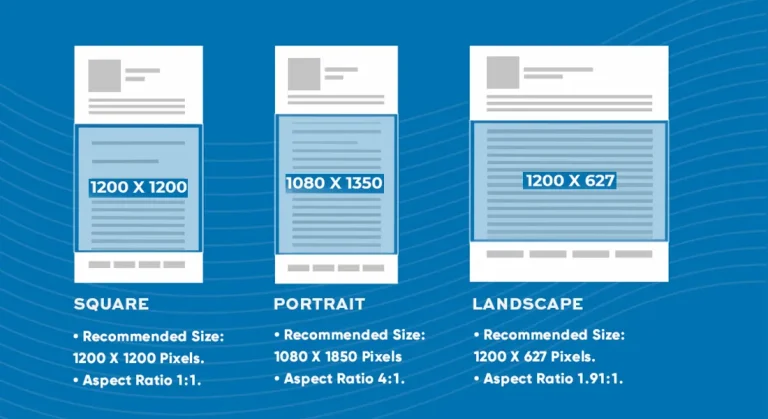
Instagram Feed Photo Sizes
- Square Images: 1080 x 1080 pixels, 1:1 aspect ratio
- Landscape Images: 1080 x 566 pixels, 1.91:1 aspect ratio
- Vertical Images: 1080 x 1350 pixels, 4:5 aspect ratio
- Maximum Resolution: Images can be up to 2048 pixels on the longest side
When uploading images to Instagram, it’s important to consider how they will appear in your overall feed. For instance, square images maintain consistency in your feed, while vertical images take up more screen space, which can be beneficial for catching a user’s attention.
💡 Practical Tips for Optimizing Instagram Photos
- Use Consistent Filters and Styles: Maintaining a consistent aesthetic across your Instagram feed can help reinforce your brand identity. Whether you use a specific filter or color scheme, consistency can make your feed more visually appealing.
- Consider the Grid Layout: Think about how your posts will appear next to each other on your profile grid. Planning your posts in advance can help you create a cohesive and visually engaging layout.
- High-Quality Images: Always start with high-resolution images. Even though Instagram compresses files, beginning with a quality image ensures the final product looks its best.
Instagram Reels and Stories: A Closer Look 🔎
Instagram Reels and Stories have become incredibly popular for sharing quick, engaging video content. Here’s what you need to know about their specifications.
Instagram Reels Specifications
- Minimum Resolution: 720 pixels
- Aspect Ratio: 1.91:1 to 9:16
- Cover Photo: 420 x 654 pixels, 1:1.55 aspect ratio
- Maximum File Size: 4 GB
- Maximum Length: 90 seconds
Reels are designed to capture attention quickly, so make sure your content is engaging from the very first frame. The cover photo is also crucial, as it’s the first thing users see before they decide to watch your Reel.
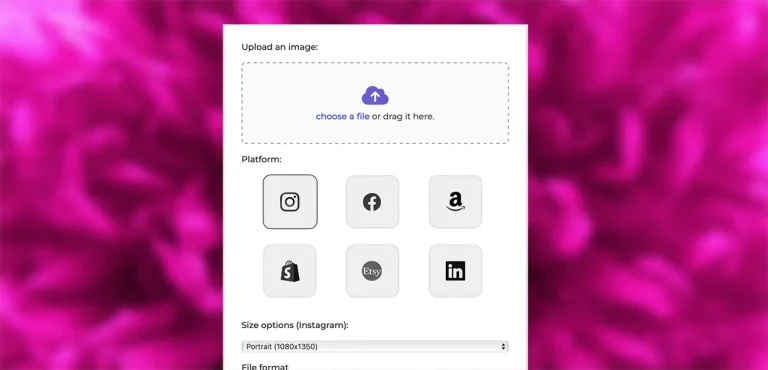
Use our Free Image Resizer
Resize your photos now with the Pro Photo Studio Image Resizer!
Instagram Stories Specifications
- Resolution: 1080 x 1920 pixels
- Aspect Ratio: 9:16
- Maximum File Size: 4 GB
- Maximum Length: 15 seconds per Story
Instagram Stories are perfect for sharing moments that don’t require permanence, as they disappear after 24 hours. To make your Stories stand out, use the full vertical space and keep text and important elements centered, as the edges may be cut off depending on the viewer’s device.
Best Practices for Instagram Stories and Reels
- Use Engaging Captions and Stickers: Stories and Reels offer various interactive elements like stickers, polls, and questions. These can help boost engagement by encouraging viewers to interact with your content.
- Leverage Music and Sound Effects: Audio is a big part of Reels, and using popular or trending music can increase your content’s visibility.
- Plan Content for Both Formats: Consider creating content that works well in both Stories and Reels to maximize reach without doubling your workload.
Facebook Post Sizes and Ad Specifications

Facebook continues to be a powerful platform for reaching a wide audience. However, like Instagram, it has specific size requirements that must be met to ensure your content is displayed correctly.
Key Facebook Post Dimensions
- Standard Feed Images: 1080 x 1350 pixels
- Link Image Size: 479 x 246 pixels for desktop; 320 pixels minimum width for mobile
- Horizontal Images: Recommended 3:2 aspect ratio or wider
- Square Images: 500 x 500 pixels
Facebook’s feed is a mix of various types of content, from links to videos and photos. Ensuring your images are properly sized is crucial to maintaining quality and engagement.
Enhancing Your Facebook Feed Content
- Optimize for Mobile Viewing: Since a significant portion of Facebook users access the platform via mobile devices, it’s important to ensure your images and videos are optimized for smaller screens.
- Use Descriptive Captions: Facebook allows more text in captions compared to Instagram, so take advantage of this by providing context or additional information that can engage your audience.
- Incorporate CTAs: Encourage interaction by including clear calls-to-action (CTAs) in your posts, such as “Learn More,” “Shop Now,” or “Comment Below.”
Facebook Ad Specs You Need to Know 📚
Facebook ads are a critical component of many marketing strategies. Understanding the specific requirements for different types of ads can help you create campaigns that deliver results.
Facebook Feed Ads
- Resolution: 1080 x 1080 pixels, 1:1 aspect ratio
- Maximum File Size: 30 MB
- Formats: JPG, PNG
- Primary Text: 125 characters
- Headline: 27 characters
- Description: 27 characters
Feed ads appear directly in a user’s news feed and need to be visually compelling to stand out among other content.
Carousel Ads
- Resolution: 1080 x 1080 pixels
- Aspect Ratio: 1:1
- Maximum File Size: 30 MB per image; 4 GB per video
- Number of Cards: 2–10 per carousel
- Primary Text: 125 characters per card
- Headline: 32 characters per card
- Description: 18 characters per card
Carousel ads allow you to showcase multiple images or videos in a single ad, making them ideal for highlighting different products or features.
Facebook Right Column Ads
- Resolution: 1080 x 1080 pixels (minimum 254 x 133 pixels)
- Aspect Ratio: 1:1
- Maximum File Size: 30 MB
- Headline: 40 characters
These ads appear in the right column of Facebook on desktop and are smaller, so they should be concise and to the point.
Crafting Effective Facebook Ads
- Prioritize Visuals: Since users scroll quickly through their feeds, ensure your ad visuals are eye-catching and immediately convey your message.
- Test Different Formats: Use A/B testing to determine which ad formats and creatives perform best with your target audience.
- Use Clear, Compelling Text: With limited characters available for text, make sure every word counts. Your headline and primary text should be direct and compelling.
Facebook and Instagram Video Content: Essential Specs and Best Practices

Video content is an increasingly vital part of social media marketing. Both Facebook and Instagram offer multiple ways to share videos, each with its own set of specifications.
Facebook Video Specifications
Facebook allows videos in various contexts, from feed posts to ads, each requiring specific dimensions and formats. Below are the key specifications for the most common video types on Facebook.
Facebook Feed Videos
- Resolution: Minimum of 1080 x 1080 pixels
- Aspect Ratio: 1.91:1 (landscape) to 1:1 (square)
- Maximum File Size: Up to 4 GB
- Video Length: Up to 240 minutes
- Formats: MP4 or MOV
Feed videos are versatile and can be used to share everything from short clips to longer-form content. Because they auto-play as users scroll through their feed, capturing attention within the first few seconds is essential.
Facebook Video Ads
- Resolution: 1080 x 1080 pixels minimum (for square videos); 1080 x 1920 pixels (for vertical videos)
- Aspect Ratio: 1.91:1 to 4:5
- Maximum File Size: 4 GB
- Video Length: 1 second to 240 minutes, depending on the ad placement
- Formats: MP4, MOV, or GIF
Facebook video ads can be used in a variety of placements, including the feed, stories, and in-stream ads. These ads need to be engaging and optimized for both desktop and mobile viewing.
Facebook Stories Video Ads
- Resolution: 1080 x 1920 pixels
- Aspect Ratio: 9:16 (vertical)
- Maximum File Size: 4 GB
- Video Length: 15 seconds per segment
- Formats: MP4 or MOV
Stories ads are full-screen vertical videos that appear between user-generated content. They’re ideal for immersive content and need to be brief yet impactful to maintain viewer engagement.
Use our Free Image Resizer
Resize your photos now with the Pro Photo Studio Image Resizer!
Facebook Feed Videos
Instagram offers several ways to share video content, including feed posts, stories, and Reels. Each format has unique specifications that can affect how your video is displayed and consumed by your audience.
Instagram Feed Videos
- Resolution: 1080 x 1080 pixels minimum
- Aspect Ratio: 1.91:1 (landscape) to 4:5 (portrait)
- Maximum File Size: 4 GB
- Video Length: Up to 60 minutes
- Formats: MP4 or MOV
Feed videos on Instagram are automatically converted into Reels if they meet the appropriate length and format criteria. These videos can be used to share content directly in the user’s feed, where they auto-play as the user scrolls.
Instagram Reels Specifications
- Resolution: Minimum of 720 pixels
- Aspect Ratio: 9:16 (full screen vertical)
- Maximum File Size: 4 GB
- Video Length: Up to 90 seconds
- Formats: MP4 or MOV
Reels are designed for quick, engaging content that’s easily discoverable in Instagram’s Explore tab. The format’s popularity has skyrocketed, making it a key area for marketers to focus on.
Instagram Stories Video Specifications
- Resolution: 1080 x 1920 pixels
- Aspect Ratio: 9:16
- Maximum File Size: 4 GB
- Video Length: 15 seconds per story
- Formats: MP4 or MOV
Instagram Stories offer a unique way to connect with your audience through ephemeral content. Since stories disappear after 24 hours, they’re perfect for sharing time-sensitive updates or behind-the-scenes content.
Best Practices for Creating Engaging Video Content
Creating video content that not only adheres to the technical specifications but also engages your audience requires careful planning and execution. Here are some best practices to ensure your videos make an impact:
Hook Your Audience Quickly
Given that both Facebook and Instagram videos auto-play as users scroll through their feeds, it’s essential to capture their attention within the first few seconds. Start with a visually compelling scene or an intriguing question to draw viewers in.
Optimize for Mobile Viewing
Most social media users access content on mobile devices. Ensure your videos are optimized for mobile by using vertical or square formats that fill the screen, making it easier for users to engage with your content.
Incorporate Text and Subtitles
Since videos often auto-play without sound, including text overlays or subtitles can help convey your message even when the sound is off. This is particularly important for ads and informative content.
Use High-Quality Visuals and Audio
Poor video quality can quickly turn viewers away. Invest in good lighting, clear audio, and high-definition video to ensure your content looks professional. Consider using tools or apps designed to enhance video quality.
Include a Strong Call-to-Action (CTA)
Every video should have a purpose, whether it’s to inform, entertain, or convert. Including a clear CTA at the end of your video can guide viewers on what to do next, whether it’s visiting your website, following your profile, or making a purchase.
Tools to Enhance Your Video Content

Creating high-quality video content doesn’t have to be difficult. Several tools can help streamline the process and ensure your videos are polished and professional.
Video Editing Software
Tools like Adobe Premiere Pro, Final Cut Pro, or even simpler apps like InShot and CapCut can help you edit videos to meet the required specifications. These tools allow you to trim, add effects, and optimize your videos for social media.
Social Media Management Platforms
Platforms like Hootsuite, Buffer, and Later allow you to schedule and preview your video posts across different devices. This ensures your content appears as intended on both mobile and desktop.
Analytics Tools
To track the performance of your videos, tools like Facebook Insights and Instagram Analytics are invaluable. These platforms provide detailed metrics on views, engagement, and audience demographics, helping you refine your content strategy.
Best Practices for Optimizing Social Media Content
While following the correct specifications is crucial, there are additional strategies that can help you maximize the effectiveness of your social media content.

Consistency is Key
Maintaining a consistent posting schedule can help keep your audience engaged and ensure your content remains top-of-mind. Tools like Hootsuite or Buffer can help you plan and schedule your posts in advance, ensuring a steady flow of content.
Develop a Content Calendar
A content calendar helps you plan out your posts ahead of time, ensuring that you’re consistently delivering valuable content to your audience. It also helps you stay organized and prevents last-minute scrambling for content ideas.
Tailor Content to Each Platform
While it might be tempting to post the same content across all platforms, each social media platform has its own unique audience and content preferences. Tailoring your content to fit the nuances of each platform can improve engagement and reach.
Understanding Platform Demographics
Different platforms attract different audiences. For instance, Instagram is popular among younger demographics, while Facebook has a broader age range. Understanding these demographics can help you create content that resonates with the right audience.
Use Analytics to Refine Your Strategy
Regularly reviewing the performance of your posts can provide valuable insights into what works and what doesn’t. Use these insights to refine your content strategy and focus on the types of posts that resonate most with your audience.
A/B Testing Content
A/B testing involves creating two versions of the same post with slight variations and analyzing which performs better. This method can help you determine the most effective content strategies for your audience.
Keep Up with Platform Changes
Social media platforms are constantly evolving, with new features and changes to algorithms being introduced regularly. Staying informed about these changes can help you adapt your strategy and take advantage of new opportunities.
Follow Industry News
Subscribing to industry newsletters, following social media blogs, and keeping an eye on platform announcements can help you stay up-to-date with the latest trends and changes. This knowledge can be crucial in adapting your content strategy to stay relevant.
Conclusion: Elevate Your Social Media Strategy
In the competitive world of social media, understanding and adhering to the correct post sizes, photo dimensions, and ad specifications for platforms like Facebook and Instagram is just the beginning. By implementing the best practices outlined in this guide, you can enhance the visual appeal of your content, increase engagement, and achieve your marketing goals more effectively.
Remember, the key to success on social media is not just about following the technical specifications but also about creating content that resonates with your audience. By staying consistent, tailoring your content to each platform, and continually refining your strategy based on performance data, you can ensure that your social media efforts are both effective and impactful.
As you move forward into the new year, keep these tips and strategies in mind, and watch as your social media presence grows and thrives. Whether you’re optimizing your photos, crafting engaging videos, or running targeted ad campaigns, the right approach will help you stand out in a crowded digital landscape.
Ready to take your social media content to new heights? Start implementing these strategies today, and you’ll be well on your way to achieving outstanding results.
Use our Free Image Resizer
Resize your photos now with the Pro Photo Studio Image Resizer!
FAQs
Instagram supports multiple aspect ratios including 1:1 (square), 4:5 (vertical), 16:9 (horizontal), and 9:16 for full-screen vertical formats like Stories and Reels
The best image size depends on the format:
- Square: 1080 x 1080 pixels (1:1)
- Vertical: 1080 x 1350 pixels (4:5)
- Landscape: 1080 x 566 pixels (16:9)
Instagram Reels should have a minimum resolution of 720 pixels with a 9:16 aspect ratio (full-screen vertical). The maximum file size is 4 GB, and the video length can be up to 90 seconds.
Facebook Feed ads are best at 1080 x 1080 pixels for a 1:1 aspect ratio. For landscape ads, 1200 x 628 pixels with a 1.91:1 aspect ratio is recommended. The information matches the current guidelines
Facebook videos can be up to 240 minutes long, depending on the format. However, shorter, more engaging content typically performs better, especially in Feed ads and Stories.
Instagram Stories should be 1080 x 1920 pixels with a 9:16 aspect ratio to ensure they fill the screen properly and avoid cropping.
To optimize images for Instagram, use the recommended dimensions (e.g., 1080 x 1080 pixels for square posts), ensure high resolution, and maintain the correct aspect ratio. Additionally, compress images to reduce file size without compromising quality.
if you’re looking to increase your online conversion but still feel you are not sure where to start – check out these resources below: