AI clothing photography - From an-on-white to a Lifestyle Photos with models

AI clothing photography solves the bottleneck: your merchandising calendar is packed, your social team needs fresh content yesterday, and your PDP pages are crying out for lifestyle imagery that shows fit, vibe, and the story behind each piece.
Keep shooting on white with Pro Photo Studio as your foundation—then remix those assets inside the Pro Photo Playground app. Use product-to-model compositing and virtual try on clothing workflows to create on-brand lifestyle visuals without reshoots.
This short guide shows how to move from catalog frames to campaign-ready images quickly and cost-effectively.
Why On-White clothing Images Are Still Your Most Valuable Asset

Let’s be clear: on white clothing photography isn’t old school—it’s your creative foundation. Clean, well-lit images shot against a white backdrop give you something priceless: consistency. Every garment is captured at the same angle, with the same lighting, making those files incredibly modular.
Need to swap a jacket? Change a pose? Build an entirely new look? When your source material is uniform and high-resolution, the possibilities multiply.
Think of on-white shots as your raw ingredients. They’re easy to edit, simple to remove backgrounds from, and they stack beautifully with other assets. Whether you’re building PDP grids, email campaigns, or social carousels, that white-background consistency means you can mix, match, and remix without starting from scratch every time.
This is where Pro Photo Studio excels. As specialists in premium on-white apparel photography, they deliver the clean, detailed product frames that become the backbone of your entire visual ecosystem. Consistent angles. Studio-quality lighting. Sharp details that hold up when you scale, crop, or composite.
Ready to build your asset library? Book your on-white session and set yourself up for months of creative flexibility.
Shoot once. Remix forever with AI clothing photography.
Turn on-white product shots into on-brand lifestyle visuals—product-to-model compositing, virtual try-on clothing, and rapid fit testing inside the Pro Photo Playground.
Book a pro on-white session, then scale creative without reshoots.Fit Check — Rapid Wardrobe and Pose Testing


What It Is
Fit Check is your fast-track tool for testing wardrobe combinations and pose adjustments—all using your existing on-white product shots. Instead of booking another studio day to see how a denim jacket pairs with your new cargo pants, you apply both garments to a base model image and preview the look in minutes.
How It Works
Inputs: A clean model base image plus the wardrobe items you’ve shot on white.
Key capabilities:
- Apply garments and accessories onto a base model frame
- Change poses and tweak styling details without a reshoot
- Preview multiple merchandising looks quickly to find the winners
Best Use Cases
Your merchandising team can use Fit Check to preview outfit bundles before committing to a full shoot. Planning a spring capsule collection? Load your base pieces, test combinations, and identify which looks deserve hero treatment on your homepage.
It’s also perfect for A/B testing poses on product detail pages. Want to see if a three-quarter turn sells better than a straight-on shot? Test it fast. Planning a seasonal refresh using last year’s catalog? Apply new styling tweaks to keep imagery feeling current without reshooting every SKU.


One ecommerce manager we spoke with used Fit Check to build an entire lookbook in 48 hours—pulling from existing catalog shots and testing 20+ outfit combinations before finalizing just six for their email campaign. Time saved: three weeks. Studio costs avoided: $8,000.
Practical Tips
Start with clean, well-lit on-white images and maintain consistent angles across your products. If your T-shirt is shot at a slight left angle, your jacket should match that perspective for the most natural composite.
Keep iterations focused. Fewer changes per action—say, applying one garment at a time rather than overhauling an entire look—tends to yield higher-fidelity results.
Credit note: Fit Check actions are billed per action at 5 credits per apply, pose, or tweak, so you stay in complete control of your budget. Test what matters, skip what doesn’t.
The ROI
Speed and control. Your team can explore creative directions in the time it used to take just to schedule a call with your photographer. Launch outfit bundles faster. Reduce guesswork. Turn your catalog into a living, remixable wardrobe.
Shoot once. Remix forever with AI clothing photography.
Turn on-white product shots into on-brand lifestyle visuals—product-to-model compositing, virtual try-on clothing, and rapid fit testing inside the Pro Photo Playground.
Book a pro on-white session, then scale creative without reshoots.Virtual Try-On — Apparel on Real People Without Reshoots

What It Is
Virtual try-on apparel technology places your catalog garments onto real people or avatars, creating lifestyle-ready visuals that show how your pieces look in context. No model booking. No location scouting. Just realistic imagery that helps shoppers imagine themselves in your gear.
How It Works
Inputs: On-white garment images plus a model or subject photo (or avatar).
Key capabilities:
- Aligns the garment to the body, pose, and lighting for a natural, realistic preview
- Generates lifestyle tiles perfect for PDP pages, social drops, and personalized email marketing
- Adapts quickly to new colorways, fits, or demographic segments
Best Use Cases
Launching a new colorway but don’t have lifestyle shots yet? Virtual try-on lets you drop that fresh sage green hoodie onto your model base and publish to your site today—not three weeks from now when the reshoot gets scheduled.
It’s also ideal for tailoring imagery to different customer personas or marketing channels. Show your oversized tee on a petite model for one audience segment and a tall, athletic frame for another. Same garment. Multiple perspectives. No extra studio time.
Your social team will love this. Need to announce a product drop on Instagram at 9 a.m.? Generate lifestyle visuals the night before. Test different styling angles for ads. Keep your feed fresh without burning through your creative budget.


Practical Tips
Start with frontal or three-quarter angle subject photos that match your garment’s angle. If your shirt is shot straight-on, use a model image with a similar pose for the most seamless alignment.
Keep backgrounds simple during the try-on process—clean, neutral backdrops let the tool focus on fit and lighting. You can always composite onto a more complex scene later if needed.
This tool is built for teams that need always-on lifestyle imagery—the kind of flexibility that keeps your marketing engine running even when the studio is booked solid.
The ROI
Launch faster. Personalize smarter. Reduce dependency on traditional shoots while keeping your ecommerce product imagery feeling fresh, relevant, and conversion-focused.
Product-to-Model — Build Campaign-Ready Composites

What It Is
Product-to-Model takes your standalone product PNGs—background already removed—and combines them with a neutral model frame to craft polished, campaign-ready images. Think hero banners. Lookbooks. Homepage takeovers. This is where catalog shots become storytelling.
How It Works
Inputs: Background-removed product shots (your on-white frames converted to PNG) plus a base model image. The tool supports multi-item looks, so you can add hats, bags, footwear, and accessories to complete the scene.
Key capabilities:
- Compose full looks by layering multiple products onto one model
- Adjust background, scene, and lighting direction for visual cohesion
- Generate up to four output variations per run, letting you explore creative directions quickly
Best Use Cases
This is your tool for hero moments. Building a seasonal lookbook? Combine five pieces from your new collection onto a single model, tweak the background to match your campaign mood (desert vibes, urban grit, minimalist studio), and export four variations to test with your creative team.
It’s also perfect for homepage hero images and email headers—anywhere you need polished, on-brand lifestyle product photos that look like they came from a $15,000 shoot but were actually assembled from your existing catalog in under an hour.


One DTC brand used Product-to-Model to generate their entire fall campaign in two days. They pulled 12 products from their on-white library, built eight complete looks, and tested lighting and background variations—all before their photographer even sent the quote for a traditional campaign shoot.
Practical Tips
Use consistent angles and lighting across items for the most natural composites. If your jacket has studio lighting from the left, match that direction when selecting complementary pieces.
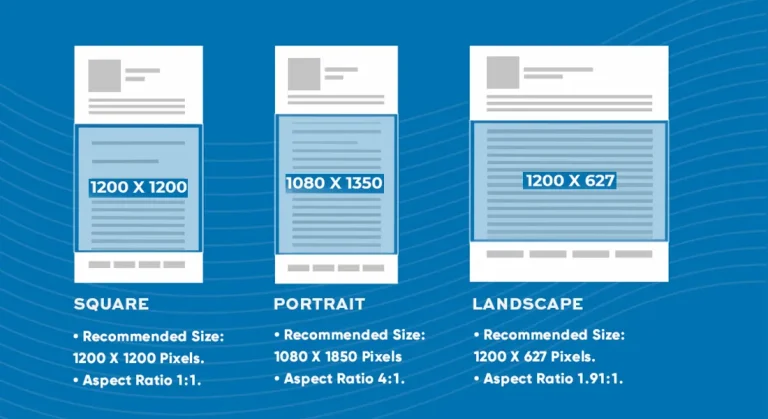
Aim for Square HD or 1:1 aspect ratios for maximum versatility. These dimensions work beautifully for both social feeds and PDP lifestyle tiles.
The ROI
Scale your creative output without scaling your budget. Launch campaigns faster. Test more ideas. Turn apparel merchandising into a creative advantage rather than a bottleneck.
Shoot once. Remix forever with AI clothing photography.
Turn on-white product shots into on-brand lifestyle visuals—product-to-model compositing, virtual try-on clothing, and rapid fit testing inside the Pro Photo Playground.
Book a pro on-white session, then scale creative without reshoots.Best Practices to Maximize Quality (and Credits)

Start with Premium Source Material
Why Pro Photo Studio on-white shots lead to better results: Consistency. Resolution. Detail. When your source images are captured with professional lighting, sharp focus, and uniform angles, every downstream tool performs better. Garbage in, garbage out—so start with the good stuff.
File Prep Matters
Prefer PNG files with backgrounds already removed for cleaner edges and faster processing. When you’re compositing garments or building multi-item looks, transparent backgrounds make alignment smoother and reduce artifacts around edges.
Match angles between your model base and your product shots wherever possible. A frontal jacket looks most natural on a frontal model pose.
Iteration Strategy
Fewer outputs per run can increase fidelity per credit. If you’re testing a single concept, run one or two variations instead of maxing out at four—you’ll often get crisper results.
Use seeds for repeatable styling. Found a look you love? Save the seed value so you can recreate similar vibes across future projects.
For heavier jobs—say, building 20 hero images for a campaign—queue them during off-peak hours or batch your requests to manage turnaround efficiently.
Credit Philosophy
These tools are designed for control and flexibility. You’re not locked into expensive monthly minimums or paying for features you don’t use. Instead, credits scale with your needs. Test a few outfit ideas? Spend a few credits. Launch a full campaign? Allocate more.
The ROI comes from avoiding reshoots, not from burning budget on unused subscriptions.
From Shoot Day to Self-Serve Creativity
Here’s your simple, repeatable workflow for turning fashion product photography into an always-fresh visual engine:
- Book an on-white session with Pro Photo Studio — Get clean, consistent product images that become your creative foundation.
- Receive your assets — High-resolution, professionally lit frames ready for any use case.
- Upload into the Pro Photo Playground app — Your library is now live and remixable.
- Pick the right tool for the job:
- Fit Check for wardrobe combos and pose testing
- Virtual Try-On for quick lifestyle tiles and colorway launches
- Product-to-Model for campaign-ready composites
- Iterate quickly — Test ideas, explore variations, and save the winners.
- Deploy across channels — Use your new visuals on PDP pages, in email campaigns, across social, and in paid ads.
Ready to get started? Schedule your Clothing on-white shoot and unlock always-fresh visuals for your brand. Then try the app and see how fast you can move from catalog to campaign.
Frequently Asked Questions (FAQs)
Nope. Virtual try-on for apparel works with standard 2D images—your on-white garment shots plus a model or subject photo. No 3D rendering or specialized files required.
Absolutely. That’s the entire premise. On-white product photography gives you clean, modular assets that can be remixed into lifestyle-ready visuals using tools like Virtual Try-On and Product-to-Model. Keep your catalog shots as the foundation, then build lifestyle imagery on demand.
Frontal and three-quarter angles tend to perform best because they show garment details clearly and align naturally with standard model poses. Consistency matters most—if your products are all shot at the same angle, your composites will look more cohesive.
Very realistic when you start with high-quality source material. Clean on-white shots with good lighting and consistent angles produce natural-looking lifestyle images. The tools handle alignment, lighting adaptation, and edge blending—but the quality of your input files sets the ceiling.
Many on-white images export as PNGs with transparent backgrounds automatically, but if yours don’t, most design tools (or the app itself) can handle quick background removal. For upscaling or resolution boosts, prep your files before uploading to ensure the best results from downstream tools.
Keep Clothing On-White as Your Foundation—Then Scale
Here’s the truth: you don’t need to abandon catalog photography to get lifestyle imagery. You need both. On-white product shots give you consistency, modularity, and a library that never goes out of date. AI apparel tools give you speed, creative flexibility, and the ability to test ideas without committing to expensive reshoots.
Shoot on white with Pro Photo Studio. Upload to the Pro Photo Playground app. Pick the right tool—Fit Check, Virtual Try-On, or Product-to-Model—and start remixing your catalog into lifestyle-ready visuals that drive conversions.
Book your apparel on-white session today and build the asset library that powers your next six months of marketing. Then try the app and see how fast you can go from product shot to campaign hero.
if you’re looking to increase your online conversion but still feel you are not sure where to start – check out these resources below:
Related articles