

Did you know that optimizing photos for your website can significantly improve your search rankings and user experience? In today’s digital marketplace, image optimization isn’t just a technical consideration—it’s a critical factor that directly impacts your conversion rates and SEO performance.
Unlike social networks that automatically optimize images, websites and eCommerce platforms require strategic optimization to ensure fast loading times and proper display across all devices. In this comprehensive guide, we’ll explore everything you need to know about photo optimization for the web in 2025, including our free image resizer tool that makes the process effortless.
Table of Contents
- What is Photo Optimization?
- Why Optimize Photos for Your Website?
- The Critical Importance of Photo Optimization
- Reducing Server Load with Optimized Photos
- 7 Essential Steps to Optimize Photos for Websites
- Step 1: Determine Your Website’s Loading Speed
- Step 2: Optimize Image File Names for SEO
- Step 3: Choose the Optimal Image Format
- Step 4: Resize Photos to Ideal Dimensions
- Step 5: Compress Images Without Quality Loss
- Step 6: Use WordPress Plugins for Automation
- Step 7: Implement Lazy Loading for Better Performance
- Our Free Image Resizer Tool
- Conclusion
- Frequently Asked Questions
What is Photo Optimization?
Photo optimization is the strategic process of delivering high-quality visual content while minimizing file size to ensure optimal website performance. This process involves adjusting format, dimensions, size, resolution, and metadata to create the perfect balance between visual quality and loading speed.
In 2025, optimizing photos has become more sophisticated than ever, with advanced tools and techniques that preserve image quality while dramatically reducing file sizes. The goal is to create visually stunning websites that load quickly across all devices and network conditions.
Why Optimize Photos for Your Website?

Reducing image size while maintaining quality is essential for website performance
It’s well-established among web developers that unoptimized images are one of the primary causes of slow-loading websites. Even with premium hosting, advanced caching systems, and optimized infrastructure, improperly sized images will significantly degrade your site’s performance.
From a business perspective, optimizing photos helps manage hosting costs by reducing storage and bandwidth requirements. Here are the key reasons why photo optimization should be a priority:
- Enhances user experience with faster page loading
- Improves search engine rankings (Google prioritizes fast-loading websites)
- Reduces bounce rates caused by slow loading times
- Increases pages viewed per session
- Drives higher conversion rates
- Provides competitive advantage over non-optimized websites
- Conserves bandwidth and storage on your hosting plan
The Critical Importance of Photo Optimization
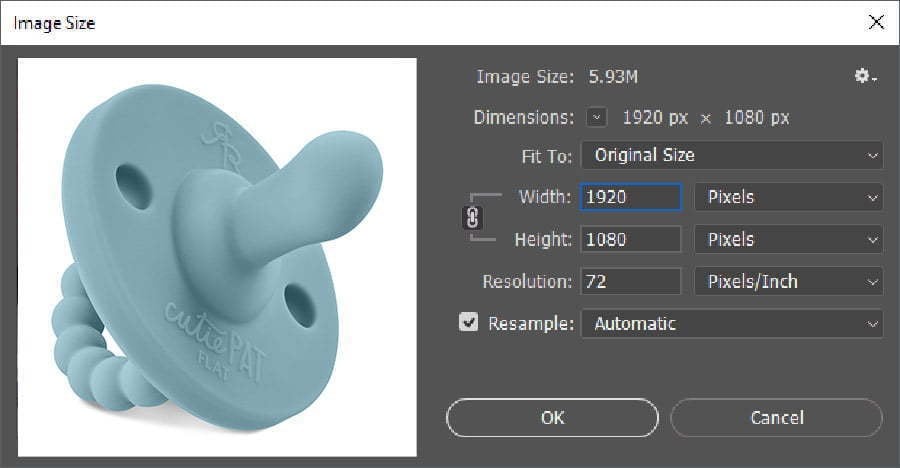
Professional tools like Photoshop can help compress images without losing quality
The significance of optimizing photos extends beyond technical considerations—it directly impacts business results. Recent studies show that the ideal loading time for mobile websites should not exceed 3 seconds, with some research suggesting even stricter 2-second thresholds. When pages take longer to load, a staggering 53% of visitors abandon the site entirely.
This high bounce rate represents potential customers who are unlikely to return to a slow-loading site. Additionally, search engines like Google now explicitly factor page speed into their ranking algorithms, making image optimization a direct contributor to your SEO success.
In 2025, photo optimization delivers two primary benefits:
- Performance Enhancement: Ensuring your website loads quickly and efficiently across all devices and connection speeds.
- Improved User Experience: Providing visitors with high-quality visuals that render quickly and display correctly.
Reducing Server Load with Optimized Photos

Server response times improve significantly when images are properly optimized
Your hosting server is responsible for delivering all website elements—pages, text, colors, and images—to visitors. When you optimize photos, you significantly reduce the workload on your server, resulting in improved overall performance and reduced hosting costs.
In 2025, with increased emphasis on sustainability in digital operations, optimizing images has become not just a performance consideration but also an environmental one. Smaller image files mean less energy consumption for data transfer and storage—a small but meaningful contribution to reducing your digital carbon footprint.
7 Essential Steps to Optimize Photos for Websites
Follow this comprehensive checklist to effectively optimize photos for your website and improve your overall web performance.
Step 1: Determine Your Website’s Loading Speed

Testing your website’s speed is the first step to identifying image optimization needs
Before optimizing your images, establish a baseline by measuring your website’s current loading speed. This metric is a critical ranking factor for search engines and directly impacts user experience.
In 2025, several advanced tools can help you analyze your site’s performance:
- Google PageSpeed Insights: Provides both mobile and desktop performance scores with specific recommendations.
- GTmetrix: Offers detailed loading statistics and optimization suggestions.
- WebPageTest: Allows testing from different locations and connection types.
- Lighthouse: Google’s automated tool for improving web page quality.
These tools will generate comprehensive reports highlighting loading times and specific issues, providing valuable insights into how image optimization can improve your site’s performance.
Step 2: Optimize Image File Names for SEO
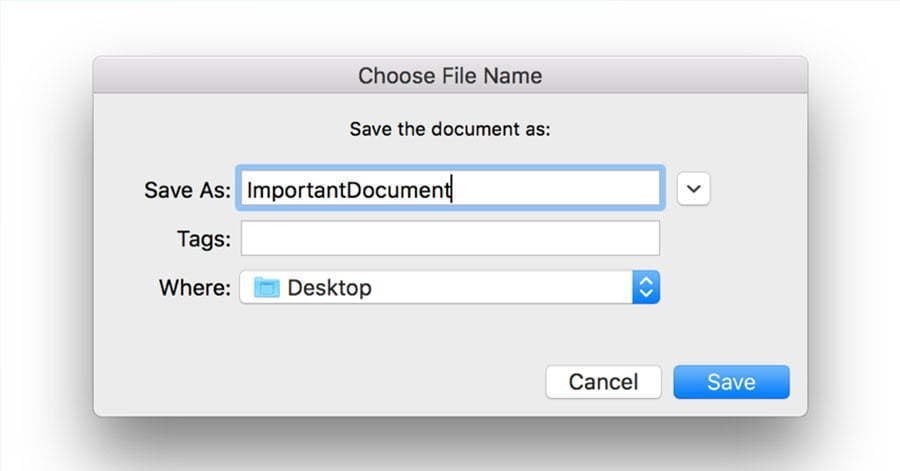
Descriptive file names improve both organization and search engine visibility
Never upload images with their default file names (e.g., IMG_20250214_153722.jpg). Search engines can’t visually interpret images, but they can read file names, which makes proper naming an important aspect of photo optimization.
Best practices for image file naming in 2025:
- Use descriptive names that include your target keywords
- Separate words with hyphens (e.g., “optimize-photos-ecommerce.jpg”)
- Keep names concise but descriptive
- Include product SKUs or identifiers for eCommerce images
- Ensure consistency across your naming conventions
This practice not only strengthens your SEO efforts but also improves content organization and workflow efficiency.
Step 3: Choose the Optimal Image Format
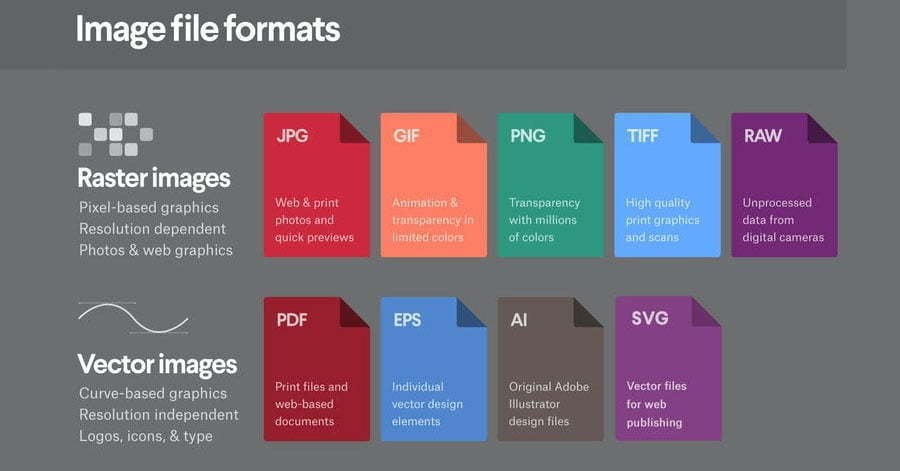
Different image formats serve different purposes for web optimization
Different image formats serve different purposes, and choosing the right one is essential for optimizing photos. In 2025, the following formats are most commonly used:
- WebP: Google’s modern image format that provides superior compression for both lossy and lossless images. WebP files are typically 25-35% smaller than comparable JPEG or PNG files while maintaining similar visual quality. Now supported by all major browsers, this should be your default choice for web images in 2025.
- AVIF: The newest standard offering even better compression than WebP, with excellent quality-to-size ratio. Ideal for sites focusing on cutting-edge performance.
- JPEG/JPG: Still widely used for photographs and complex images with millions of colors. Offers good compression but is lossy (reduces quality slightly).
- PNG: Best for images with transparency, graphics with text, or images with few colors. Provides lossless compression but results in larger file sizes than JPEG.
- SVG: Vector format ideal for logos, icons, and simple illustrations. Scales perfectly to any size without quality loss and typically has very small file sizes.
In 2025, modern content management systems and CDNs often automatically serve images in next-gen formats like WebP or AVIF to compatible browsers while falling back to JPEG/PNG for older browsers.
Step 4: Resize Photos to Ideal Dimensions
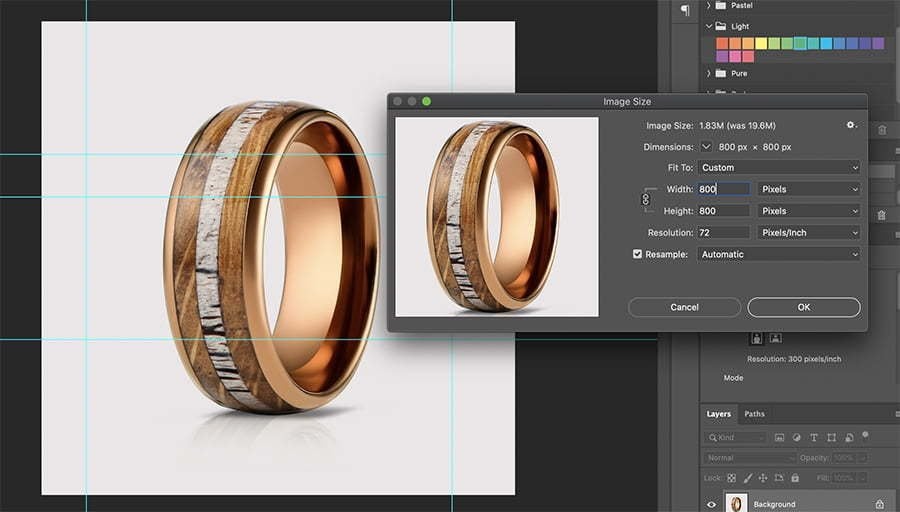
Properly sized images improve loading speed without sacrificing quality
Using images larger than necessary is a common performance mistake. Optimizing photos through proper resizing is crucial for website performance—there’s no reason to upload a 5000px-wide image when the display area is only 800px wide.
To resize your images appropriately:
- Determine the largest size at which your image will display
- Consider high-density (Retina) displays by making images 1.5x-2x larger than their display size
- Use our free image resizer tool to quickly adjust dimensions
- For eCommerce product images, maintain consistent dimensions across similar products
In 2025, with responsive design being standard, you should implement responsive images using HTML’s srcset and sizes attributes to serve different image sizes based on screen dimensions. This advanced approach to photo optimization ensures optimal performance across all devices.
For general website content, a maximum width of 1920px (for hero images) or 1200px (for in-content images) with 72-96 DPI resolution is typically sufficient. For eCommerce product images, maintaining consistent dimensions (typically 1000-1500px) ensures a uniform shopping experience.
Step 5: Compress Images Without Quality Loss
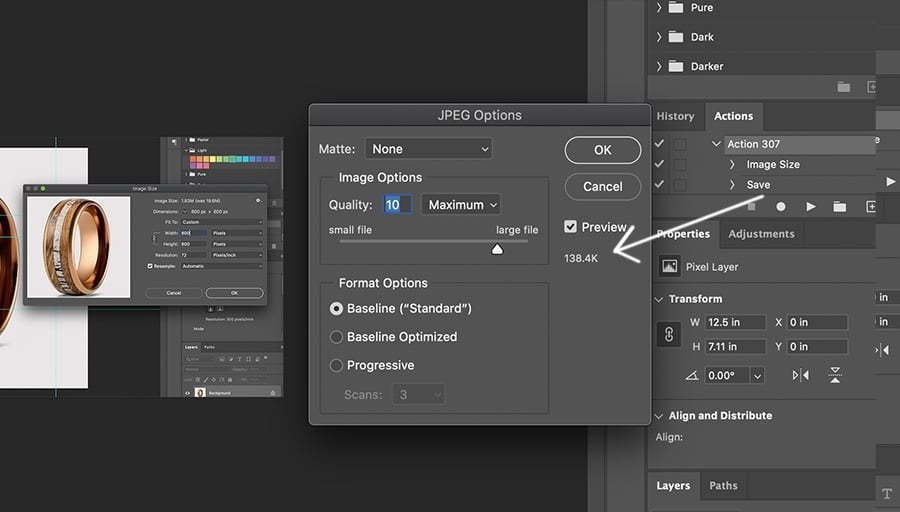
Modern compression techniques maintain visual quality while reducing file size
Resizing alone isn’t sufficient for optimizing photos—compression is essential for reducing file size while preserving visual quality. Modern compression algorithms can reduce file sizes by 60-80% with minimal or no perceptible quality loss.
In 2025, these are the top tools for image compression:
- Our Free Image Resizer: Combines resizing and compression in one easy tool
- DupliChecker: An online tool to compress JPEG to 50KB without losing quality.
- ImageOptim: Desktop app for Mac that provides lossless compression
- ShortPixel: AI-powered compression service with excellent quality-to-size ratio
- TinyPNG/TinyJPG: Web-based service that dramatically reduces PNG and JPEG file sizes
- Squoosh: Google’s advanced compression tool with fine-grained control
When compressing images, aim for the sweet spot between quality and file size. For most web images, a quality setting of 70-80% offers an excellent balance, typically reducing file size by 50-70% with minimal visual difference.
Step 6: Use WordPress Plugins for Automation
WordPress plugins automate the image optimization process for your entire website
For WordPress websites, image optimization plugins can automate the process of optimizing photos as they’re uploaded. These plugins handle resizing, compression, and format conversion with minimal manual intervention.
Top WordPress image optimization plugins in 2025:
- Optimole: Cloud-based optimization with automatic WebP conversion and responsive images
- ShortPixel: Powerful compression with support for multiple formats including AVIF
- Smush Pro: Comprehensive solution with bulk optimization and lazy loading
- EWWW Image Optimizer: Local optimization that doesn’t rely on external services
- Imagify: User-friendly interface with multiple compression levels
These plugins not only optimize new uploads but can also process your existing media library, ensuring consistent optimization across your entire website.
Step 7: Implement Lazy Loading for Better Performance
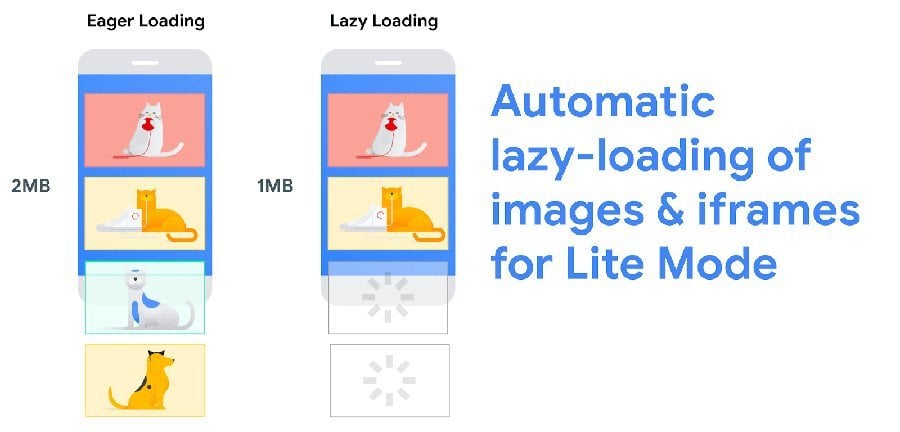
Lazy loading defers image loading until they become visible in the viewport
Lazy loading is an essential technique for optimizing photos on your website. Instead of loading all images at once, lazy loading defers the loading of off-screen images until users scroll to them. This dramatically improves initial page load times and conserves bandwidth.
In 2025, lazy loading has become more sophisticated with:
- Native browser support: Most modern browsers now support the
loading="lazy"attribute - Intelligent preloading: Advanced algorithms predict which images users might view next
- Low-quality image placeholders (LQIP): Tiny placeholder images that load instantly
- Blurhash previews: Compact representations of images that show a blurred preview while loading
Implementing lazy loading is as simple as adding the loading="lazy" attribute to your image tags, or by using a WordPress plugin that handles this automatically.
Our Free Image Resizer Tool

A woman optimizing photos using Pro Photo Studio’s free image resizer tool
At Pro Photo Studio, we’re committed to helping you optimize photos with minimal effort. That’s why we’ve developed a free online image resizer tool that makes the process simple and effective.
Key Features:
- Instantly resize images for any platform
- Compress without noticeable quality loss
- Convert between formats (JPEG, PNG, WebP)
- Optimize for specific platforms (Amazon, Shopify, Instagram)
- No registration required
- Free to use with no hidden costs
Benefits:
- Improve website loading speeds
- Enhance SEO performance
- Reduce bounce rates
- Save storage space
- Optimize images for mobile devices
- Perfect for eCommerce product images
Whether you’re managing an online store, updating your portfolio, or optimizing your blog, our image resizer tool provides a quick and effective solution for optimizing photos without compromising quality.
Conclusion
Optimizing photos for your website is no longer optional—it’s essential for success in today’s digital landscape. The performance improvements, SEO benefits, and enhanced user experience make image optimization one of the most impactful website improvements you can implement.
By following the seven steps outlined in this guide and utilizing tools like our free image resizer, you can dramatically improve your website’s performance while maintaining stunning visual quality.
Remember that image optimization is an ongoing process, not a one-time task. As you add new content to your website, make photo optimization part of your regular workflow to ensure consistent performance and user experience.
Need Professional Product Photography?
Beyond optimizing photos, Pro Photo Studio offers professional product photography services that showcase your products in the best possible light. From white background eCommerce shots to lifestyle imagery, we help brands build compelling visual content.
Frequently Asked Questions
What is the ideal file size for web images in 2025?
For optimal performance, aim to keep web images under 200KB, with most content images ideally below 100KB. Hero images and large banners can be slightly larger but should still be optimized for quick loading.
Does image optimization affect SEO?
Yes, significantly. Google and other search engines factor page speed into their ranking algorithms, and image size directly impacts loading times. Additionally, properly named images with relevant alt text contribute to better image search visibility.
Should I use WebP or JPEG for my website images?
WebP is generally the better choice in 2025, as it offers superior compression and is now supported by all major browsers. However, implementing a fallback system that serves JPEGs to older browsers ensures compatibility across all systems.
How can I optimize product images for eCommerce?
For eCommerce, maintain consistent dimensions (typically 1000-1500px square), use white backgrounds for main product images, compress files without losing quality, include multiple angles, and ensure color accuracy through proper white balance and calibration.
Is Pro Photo Studio’s image resizer tool really free?
Yes, our image resizer tool is completely free to use with no hidden costs or limitations. We offer this as a service to the community while showcasing our expertise in product photography and image optimization.


1 thought on “How to optimize your images for a website (2025 update)”
Great photography knowledge right here